Best VPS for MT5 Trading in 2026 — Compared by Latency & Uptime
Written by MarginVPS Infrastructure Team
Last updated: July 2026
If you trade on MT5, execution speed isn’t a nice-to-have — it directly affects your fill price. A delay of even a few milliseconds between your order and your broker’s server can turn a planned entry into slippage.
This guide compares VPS options for MT5 trading on the factors that actually matter: latency to broker servers, CPU headroom for EAs, uptime, and ease of setup — including where a Forex-specific VPS like ours makes sense, and where it doesn’t.
What Actually Makes a VPS Good for MT5
MT5 is more resource-hungry than MT4, particularly with multiple charts, indicators, or Expert Advisors running simultaneously. Four things matter most:
1. Latency to your specific broker This depends entirely on physical proximity to your broker’s server, not the VPS provider’s general reputation. A VPS in the wrong city will be slow no matter how good the provider is. See our guide to choosing VPS location for matching broker to data center.
2. Dedicated (not oversold) CPU Budget general-purpose VPS providers often oversell CPU allocation. This is invisible until multiple EAs or charts are running simultaneously, at which point performance becomes inconsistent.
3. Uptime and automatic recovery Forex runs 24/5. A VPS that occasionally reboots without reconnecting MT5 automatically costs you open positions.
4. Setup complexity General-purpose cloud VPS (AWS, Google Cloud) requires you to install and configure MT5 and optimize the network yourself. Forex-specific VPS providers pre-install and pre-configure this.
Comparison: Forex-Specific vs. General-Purpose VPS
| Provider | Type | Latency to Brokers | MT5 Pre-installed | Setup Difficulty | Typical Monthly Cost |
|---|---|---|---|---|---|
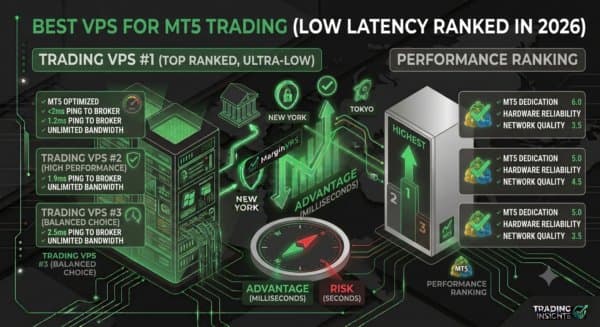
| MarginVPS | Forex-specific | 1 ~ ms average to LD4/NY4-routed brokers | Yes | Very easy | From $16.67 |
| Contabo | General VPS | Depends on region, not broker-matched | No | Easy | Low (budget pricing) |
| AWS Lightsail/EC2 | General cloud | Depends on region selected | No | Hard — manual setup | Variable, scales with usage |
| Google Cloud VPS | General cloud | Depends on region selected | No | Hard — manual setup | Variable, scales with usage |
Honest tradeoffs:
- Contabo and similar budget VPS providers are genuinely fine for non-latency-sensitive strategies (longer-term swing trades) where a few extra milliseconds don’t matter. They are not built for scalping or high-frequency EA trading, since routing isn’t optimized for broker proximity.
- AWS and Google Cloud offer strong raw infrastructure and more server locations, but require you to handle MT5 installation, RDP configuration, and latency testing yourself. This suits traders comfortable with manual cloud setup who want full control.
- Forex-specific VPS providers (including MarginVPS) trade some of that flexibility for pre-configured, broker-proximity-matched servers — the tradeoff is less relevant if you’re not doing latency-sensitive trading.
Who Actually Needs a Forex-Optimized VPS (vs. a General VPS)
A specialized, broker-proximity VPS matters most if you:
- Run Expert Advisors or automated/algorithmic strategies
- Scalp or trade high-frequency setups where milliseconds affect fill price
- Trade prop firm accounts (FTMO and similar) with strict drawdown rules where execution slippage has outsized impact
- Want to avoid manually configuring RDP, Windows, and MT5 yourself
If you place a handful of manual swing trades a week, a general-purpose budget VPS is a reasonable choice, and the latency difference likely won’t affect your results meaningfully.
Where MarginVPS Fits
For traders in the first category above, our VPS is pre-configured specifically for this use case: MT4/MT5 pre-installed, servers positioned near major broker infrastructure (LD4, NY4, FR2, Tokyo), and support that understands trading-specific issues rather than general hosting tickets. It won’t be the right fit if you want full infrastructure control or you’re not latency-sensitive — in that case, a general cloud VPS may suit you better.
See our full Forex VPS vs. Normal VPS comparison for a deeper breakdown of that decision.
Frequently Asked Questions
Is a Forex-specific VPS always better than a general cloud VPS? Not always — it depends on your strategy. Scalpers and EA traders benefit most from broker-proximity routing. Swing traders placing infrequent manual trades may not notice a meaningful difference.
What latency should I aim for with MT5? Under 5ms is excellent (achievable mainly with broker-co-located VPS). Under 20ms is good for most strategies. Above 50ms starts to noticeably affect scalping and EA performance.
Can I run MT5 on AWS or Google Cloud instead of a trading-specific VPS? Yes, but you’ll need to handle installation, RDP setup, and region selection yourself to get comparable latency — it takes more manual work than a pre-configured trading VPS.
This guide is maintained by the MarginVPS infrastructure team, operating low-latency trading servers across London (LD4), New York (NY4), Frankfurt (FR2), and Tokyo data centers.
Ready to stop losing milliseconds to your home connection?
MarginVPS runs your MT4, MT5, or cTrader terminal on a low-latency VPS inside your broker's data center — from $16.67/mo, with an extra 20% off using code EXTRA20OFF.
View VPS Plans →